 VoicePaste
Hotwords
Create and enable a group
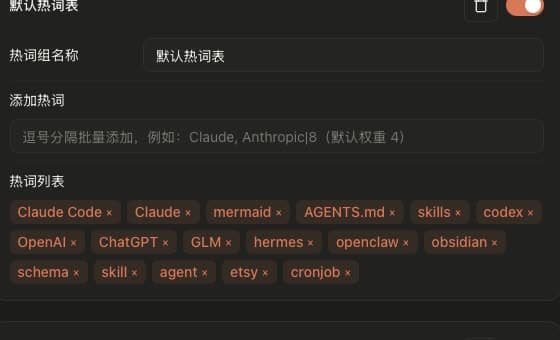
- Open Settings → Hotwords, create a group, and name it.
- Add names, products, or technical terms, such as
VoicePaste. - Enable the group you want to use. You can save multiple groups, but only one is active at a time.
Bulk entry and weights
- Separate terms with English commas and press Enter, for example
VoicePaste, Anthropic, Claude. - Use
term|weightfor an optional weight, such asAnthropic|8. The range is 1–10; the default is 4.
Enhancement and replacement
Configure these options in the current recognition model's parameters. Enhancement controls whether hotwords are added to polishing requests; it does not disable the recognizer's own hotword support:
- Enhancement · Auto: Prefer the model's own hotword support. If unavailable and this input uses polishing, provide the terms to the language model.
- Enhancement · Off: Do not add hotwords to the language model request.
- Enhancement · On: Always add terms when this input uses a language model, even if the recognizer already supports hotwords.
- Replacement: Restore matched terms to their saved form after recognition, including capitalization, punctuation, or special formatting.
Check the result
Enable the group and test a sentence containing the term. See the Volcengine guide for online hotword tables.
Common questions
Why can recognition still be wrong after adding hotwords?
Hotwords are hints, not a guarantee of correct recognition. Check the active group and your model's supported features in the compatibility list.
Why do the same weights behave differently across models?
How weights affect recognition depends on the model. Results are not identical across providers.